Projects — brindexai
brindexai logo brindexai AI Automation Agency for growing businesses
Start a project
Projects

Systems we've built, running in production

Real client builds — the workflow, the data it moves, and the output it produces. No mockups.

01 Lead generation & outreach 02 Job apply automation
Project 01 Live & running n8n · Apify · OpenAI · Google Sheets · Gmail

AI-powered Google Maps lead generation & outreach

An end-to-end system that finds local business leads from Google Maps, digs out their real contact email, writes a personalised cold email with AI, and sends it — every step logged and tracked in one Google Sheet.

The problem

Manual prospecting is slow: searching Maps, copying details, hunting for emails on websites, writing each message, tracking who was contacted. This replaces the whole pipeline with two form fields — business type and city.

n8n — lead-gen-outreach.workflow
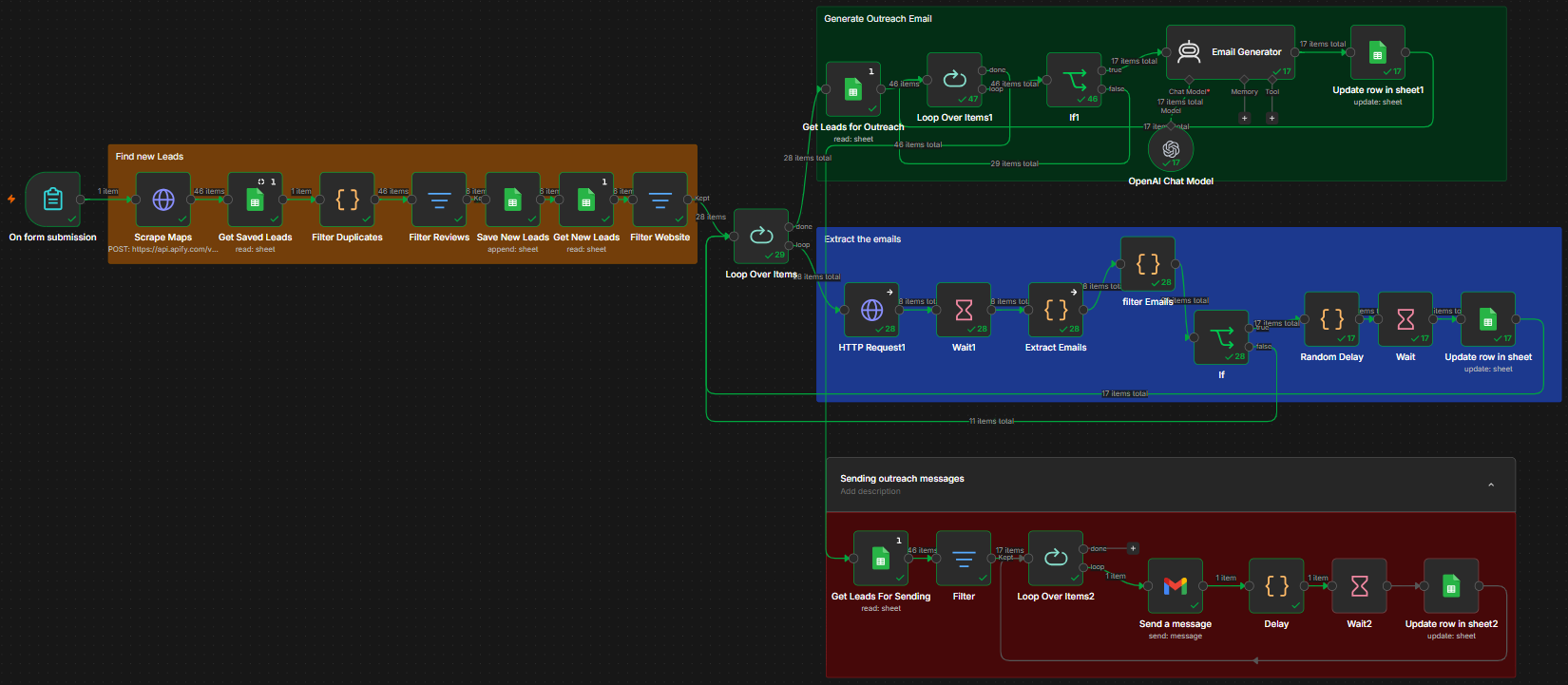
n8n workflow: find leads, extract emails, generate and send outreach
PHASE 01

Find new leads

A short form takes the business type and the city. An Apify Google Places crawler pulls each business's name, category, address, phone, website, rating and review count. Results are fuzzy-matched against the sheet, so the same business is never added twice — only new rows are appended, timestamped.
PHASE 02

Find the email, write the email

Leads with a website are crawled one at a time and every address on the page is extracted. A scoring function drops junk senders (noreply, platform and monitoring addresses) and picks the best human contact — owner, founder, hello, info — over generic support. A GPT-5-mini agent then writes a short, personal email using the business's name, category and city, referencing a relevant past project. Saved as "Ready to Send."
PHASE 03

Send & track

Only rows marked "Ready to Send" are loaded, then sent through Gmail with a subject line built per business. Randomised multi-minute gaps keep the pace human and protect sender reputation. Each row flips to "Sent" the moment it goes out — nobody is ever emailed twice.
The lead database

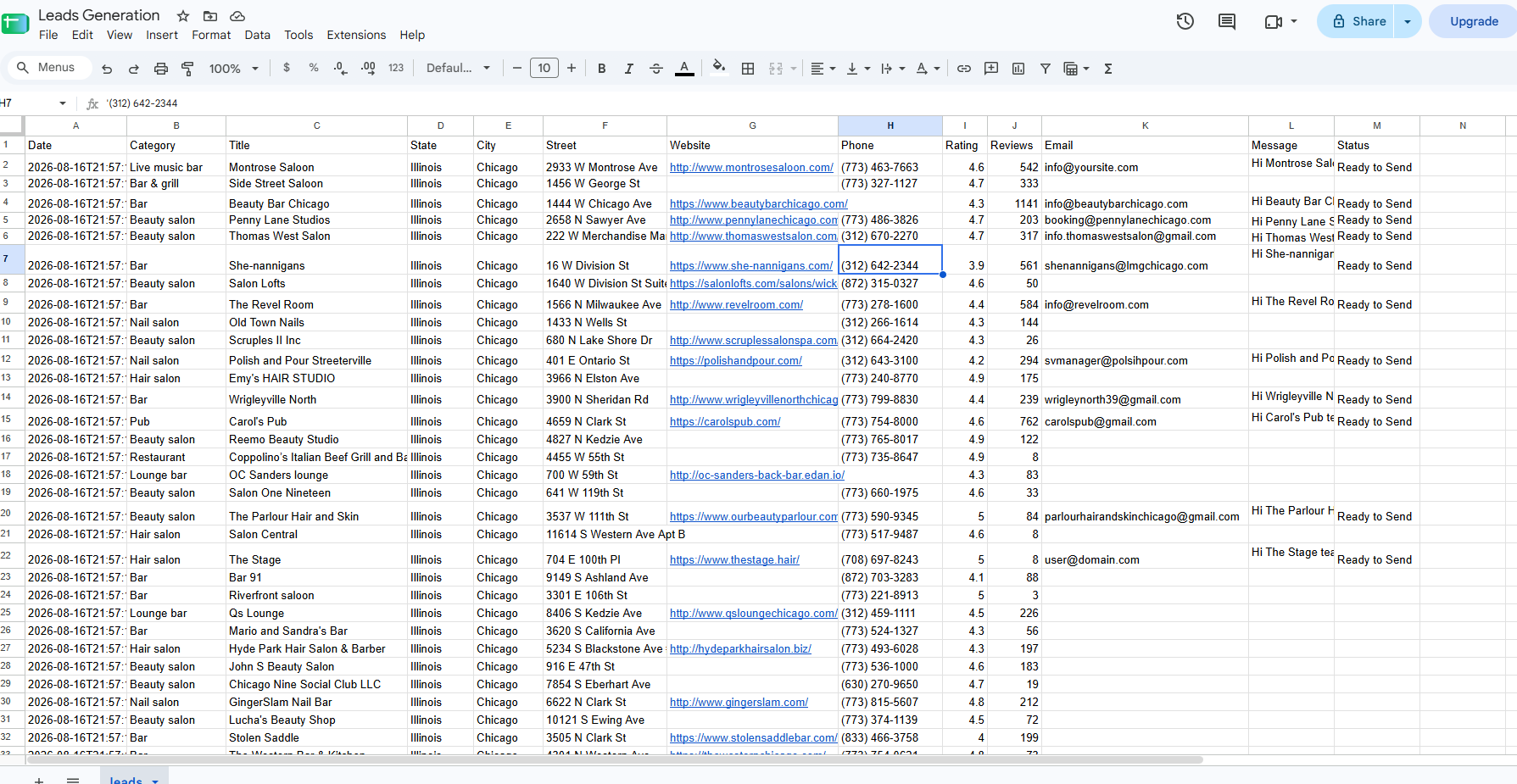
One sheet: 13 columns, every status

Date, category, business, address, website, phone, rating, reviews, the chosen email, the drafted message and its status — all in one place the client already knows how to use.

Google Sheet of scraped leads with emails, messages and status
The output

Emails that read like a person wrote them

Specific to the business, short, low-pressure, and never templated — the prompt is engineered against the usual AI tells.

Delivered outreach email in Gmail
What it changes
Two form fields replace a full day of manual prospecting Duplicate prevention on both scraping and sending The best contact address, not just the first one found Deliverability protected by human-like pacing
Built with
n8n Form trigger Apify Google Places HTTP + regex scraping Custom JS scoring OpenAI GPT-5-mini agent Google Sheets Gmail Wait / random delay
Project 02 Three connected flows n8n · SerpAPI · OpenAI · Google Docs & Sheets · Chrome extension

Job apply automation

Define your search criteria once. The system scrapes live listings, writes a uniquely tailored ATS-ready resume for every matching role, files each one as its own Google Doc, tracks the lifecycle in a sheet, emails a daily "ready to apply" digest — and fills the application forms through a companion Chrome extension.

The problem

Job hunting is repetitive: search, re-tailor the resume, remember what you applied to, then retype the same answers into long forms. The candidate's only job here is reviewing polished, role-specific output.

n8n — job-apply-automation.workflow
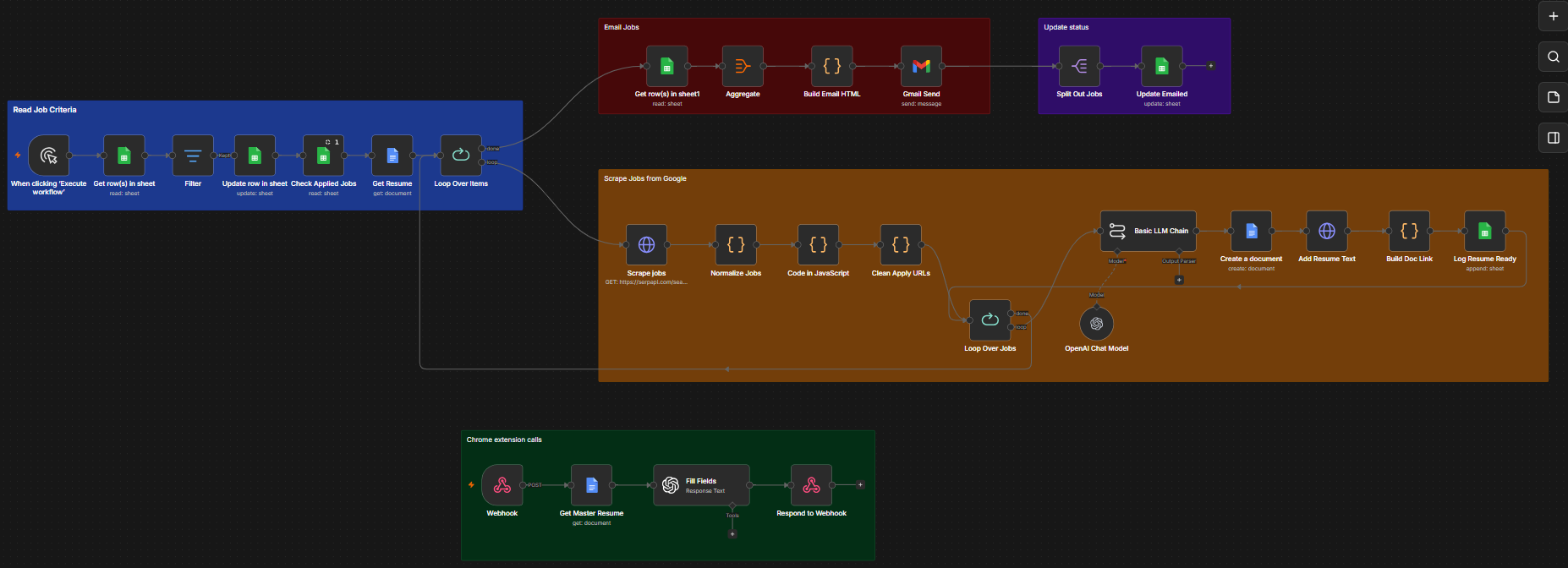
n8n workflow: read job criteria, scrape jobs, tailor resumes, email digest, Chrome extension webhook
FLOW 01

Search & tailor

Criteria rows — role, country, salary, work mode, master resume — are read from a sheet; only Pending ones run, and they're stamped Searching. SerpAPI's Google Jobs engine returns live listings; they're normalised, de-duplicated against what's already applied, and their apply links stripped of tracking params. Per job, an LLM chain rewrites the resume against that description and returns clean Docs-ready HTML — then a new CV-[Name]-[Company] doc is created, filled via the Drive API, linked, and logged as Ready to Apply.
FLOW 02

Daily digest

Everything marked Ready to Apply is aggregated into one HTML table — title, company, apply link, resume link. Gmail sends it as "Jobs ready to apply (N)". Each row then flips to Emailed, so nothing is ever sent twice.
FLOW 03

Form auto-fill, live

A companion Chrome extension posts the open job page and its detected fields to a webhook. The master resume is loaded, and a lighter model answers every field: factual ones only from resume data (blank if unknown), essay ones grounded in the real background, selects limited to the given options. The webhook returns field IDs and answers, and the form fills in place for review.
Status lifecycle
Pending Searching Ready to Apply Emailed

Two tabs hold it all: Job Criteria (role, country, salary, work mode, resume URL, status, last searched) and Applied Jobs (job ID, title, company, apply URL, resume doc link, status, dates).

What makes it safe to trust
Anti-hallucination guardrails: no invented skills, employers, metrics or certifications ATS-optimised formatting that parsers and recruiters both read cleanly Duplicate protection — a job is never processed twice Modular and credential-driven: swap job source, model or notification channel
Built with
n8n SerpAPI Google Jobs OpenAI GPT-5-mini / nano Google Docs + Drive API Google Sheets Gmail Chrome extension + webhook
More builds being written up Voice agents and client websites are next on this page. Want the walkthrough sooner? Ask for a demo ↗

Want one of these for your business?

Tell me the workflow that keeps breaking. I'll tell you whether it's worth automating — and roughly what it takes.

Ask brindexai Answers about our services
{{ m.text }}
typing…
WhatsApp us
brindexai brindexai AI Automation
Services Projects About Email Instagram
© 2026 brindexai